Ergonomic Chair Finder
If you are sitting for long hours and starting to feel neck, back, wrist, or leg pain, your chair isn't doing its job. Discomfort builds up silently over time, directly draining your focus, mood, and quality of life.
Welcome to the ErgoDirect Chair Finder! I'm Aligna, your virtual ergonomic assistant. My job is to help you find the right chair for your unique needs.
How it works:
- Answer a few quick questions about your body, your workspace, and the areas of discomfort!
- I'll pass your details to our human ergonomic experts, who will personally review your setup - completely free, no obligations.
- Get custom recommendations for a chair configured for your requirements.
Thank you - we received your answers!
Aligna collects your answers, and our specialists choose the chairs.
You will receive your personalized chair recommendations by email.
Questions in the meantime? Call us at 888-456-3746.
Free expert review Sized to your height & weight No obligation
Recommendations reviewed by ErgoDirect's ergonomic specialists.
How Does the Chair Finder Help You Find the Right Office Chair?
Finding the right ergonomic chair is much like finding clothing that fits—it needs to match your body. The ErgoDirect Chair Finder starts with the two measurements that matter most: your height, which determines the correct seat-height range and gas cylinder, and your weight, which helps identify the appropriate chair size, mechanism, and weight capacity.
The Chair Finder also asks how you typically sit and how you like your lower back supported. Some people prefer adjustable lumbar support that gently fills the natural curve of the lower spine, while others are more comfortable with a flatter backrest that provides little or no forward pressure. Understanding these preferences helps us recommend chairs with backrests that feel comfortable for your body.
Simply answer a few short questions about your body dimensions, workspace, and seating preferences. One of our human ergonomic specialists—not an algorithm—will personally review your responses and email you chair recommendations tailored to your unique needs. This personalized service is completely free, with no obligation to purchase.
If you're in the San Francisco Bay Area, you're also welcome to visit the ErgoDirect showroom in San Carlos, California, where you can try a wide selection of ergonomic chairs in person. Please call 888-456-3746 to schedule your visit.
If you would like professional guidance for your entire workstation, you can also request an optional online ergonomic assessment with a certified ergonomist.
FAQ - Choosing the Right Office Chair
- Sit with your feet flat and secure on the floor or on a footrest.
- Keep your knees at approximately 90°.
- Sit back against the backrest while maintaining the natural curve of your lower back.
- Position your knees slightly below the hips
- Have 2–3 inches of space between front edge of the seat and back of your knees.
- Relax your shoulders while using the armrests.
- Reach your keyboard and mouse without leaning forward.
- Minimum and maximum seat height - Your seat height should fall within the minimum and maximum seat height
- Seat depth – The chair's seat depth should be slightly more than yours
- Seat width – Choose a chair with a seat cushion that is slightly wider than your measurement.
- Armrest adjustment range – Measure your elbow height and make sure it falls within the minimum and maximum height range of the armrest
- Weight capacity – Your weight should be below the weight capacity of the chair
- Adjustable lumbar support
- Seat depth adjustment
- Proper seat height adjustment
- Synchronized recline
- Adjustable armrests
- Feet should rest flat on the floor or a footrest.
- Knees should be at approximately 90°.
- Thighs should be level or slightly angled downward.
- You should be able to reach your keyboard without raising your shoulders.
- Your height
- Weight
- Hip width
- Thigh length
- Desk height
- How you work
Why Chair Fit Matters
Most office chairs are built for an "average" body - but almost nobody is average. These two measurements tell you more about chair fit than any product photo.
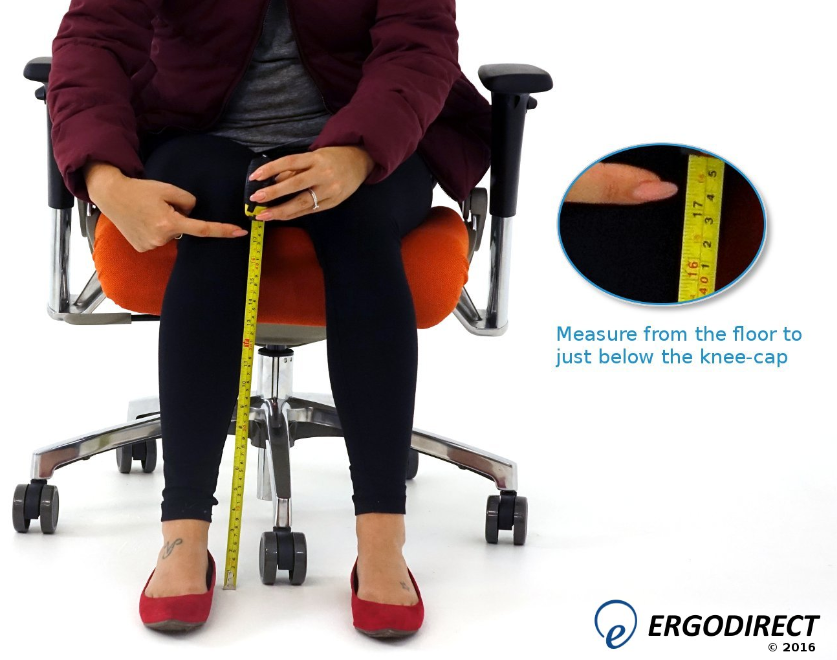
How to Measure Seat Height
- Sit down with your feet flat on the floor and knees bent at about 90 degrees.
- Measure from the floor to just below your knee-cap.
- That distance is your ideal seat height - measure in the shoes you usually wear at your desk.
Standard chair cylinders only cover a middle range of heights - that is why the Chair Finder asks for your height.
View our seat height measurement diagramHow to Measure Seat Width & Depth
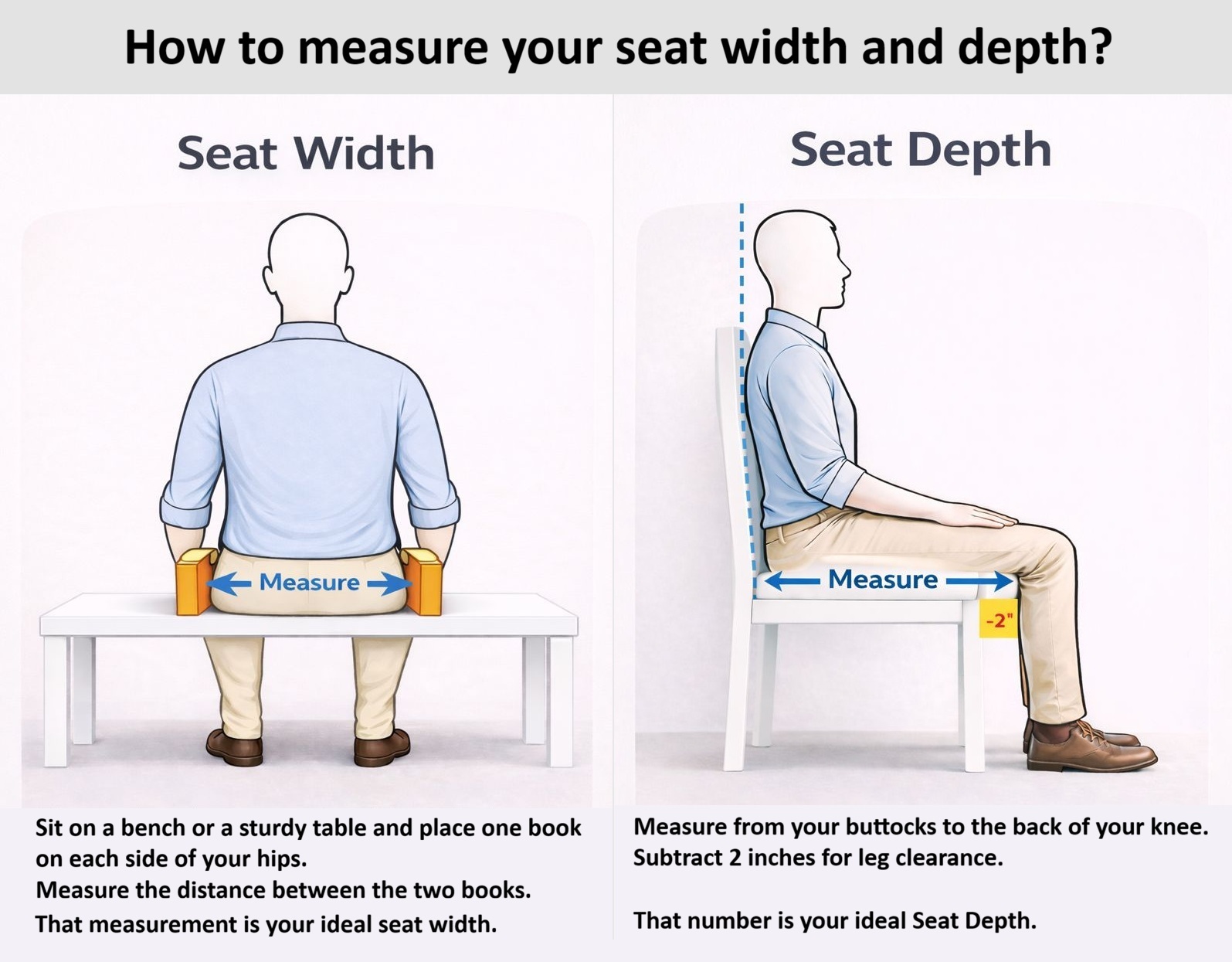
- Width: sit on a bench or a sturdy table and place a book against each side of your hips. The distance between the two books is your ideal seat width.
- Depth: while seated, measure from the back of your buttocks to the back of your knee, then subtract 2 inches for leg clearance. That number is your ideal seat depth.
Too deep and you slide forward; too narrow and the armrests press into your hips.
View our seat width & depth measurement diagramOther Online tools to help you find the right Ergonomic Chair
Workspace Planner
Find your ergonomic seat height, keyboard/mouse height and monitor height.
Seat Height Measurement
Find your seat height to choose the right cylinder.
Seat Width & Depth Measurement
Find your seat width and depth.